Midrange Gaming Build
Ryzen 5 5600X, RTX 3060, 16GB RAM, 1 SSD. Average gaming wattage: 270W. Plays 2 hours per day. Local rate: $0.16/kWh.
- Result
- (270×2)/1000 = 0.54 kWh. Daily cost: $0.09. Monthly: $2.70. Yearly: $32.85.

FREE GAMING PC ELECTRICITY CALCULATOR
Find out exactly how much electricity your gaming PC uses and what it costs to run. This calculator estimates your power consumption and electricity costs based on your hardware, gaming hours, and local rates.
Select preset and hours, then calculate
This gaming PC electricity calculator estimates the power usage and running cost of your desktop gaming system. By entering your components, daily gaming hours, and electricity price per kilowatt-hour (kWh), it calculates the wattage your PC draws while gaming and projects your cost per day, month, and year.
With so many hardware combinations out there, it's tough to know if your RTX 4070 and Ryzen 7 7800X3D build is sipping or gulping power. This tool uses measured and averaged wattages for popular CPUs and GPUs, combined with typical system overhead, to give you a realistic estimate. The output is intended for gamers who want to budget for energy costs or compare how upgrades affect their electricity bill.
Start by selecting your CPU and GPU from the dropdown menus. These are the biggest contributors to gaming power consumption. If you know your exact models, choose them for best accuracy. Next, enter your average daily gaming hours. If you play more on weekends, estimate a weekly total and divide by seven.
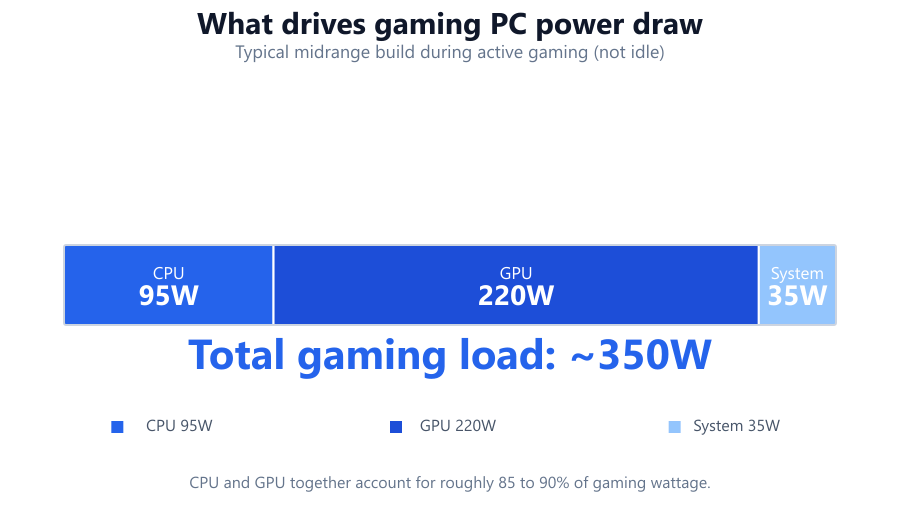
Input your local electricity rate in cents or your currency per kWh. Most utility bills list this figure. The calculator will then display your estimated wattage during gaming, as well as your projected cost per hour, day, month, and year.
You can also adjust for extra hardware like large numbers of drives, RGB lighting, or overclocking, though these add comparatively little to total draw in most systems.
The calculator uses preset average wattages for each CPU and GPU combination, based on independent testing data and manufacturer specs. It adds an estimated baseline for motherboard, RAM, SSDs, and cooling (typically 50-70W for a modern ATX system).
For each calculation:
PC Wattage = CPU Average Gaming Draw + GPU Average Gaming Draw + System Overhead
Energy Used (kWh) = (PC Wattage × Daily Gaming Hours)/1000
Cost Per Day = Energy Used (kWh) × Electricity Rate (per kWh)
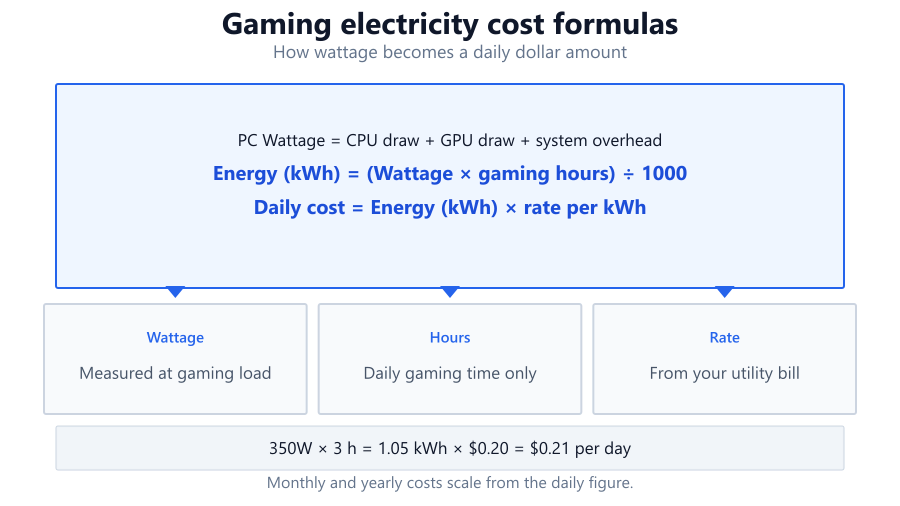
Monthly and yearly costs are scaled from the daily figure. For example, a PC drawing 350W gaming for 3 hours per day at $0.20/kWh:
Energy Used = (350 × 3)/1000 = 1.05 kWh Daily Cost = 1.05 × $0.20 = $0.21 Monthly Cost ≈ $6.30
This method assumes your PC is at typical gaming load, not idle or at maximum synthetic stress. Results are estimates - actual consumption may vary with game, resolution, or background apps.
The calculator gives you a breakdown showing your projected electricity cost to run your gaming PC. You'll see the estimated wattage during gaming, energy used per day, and the cost over various time scales. This is most relevant if you want to track your household energy usage, plan upgrades, or compare hardware efficiency.
Interpret the results as averages for your gaming habits. If you split time between gaming and desktop use, only hours spent gaming should be counted. The actual cost will be slightly higher if you leave the system on outside of gaming sessions, or if you run intensive workloads like streaming and video editing.
Keep in mind, power supplies are not 100% efficient. The calculator factors in typical efficiency losses, but extremely inefficient power supplies or extreme overclocking may push real-world numbers higher.
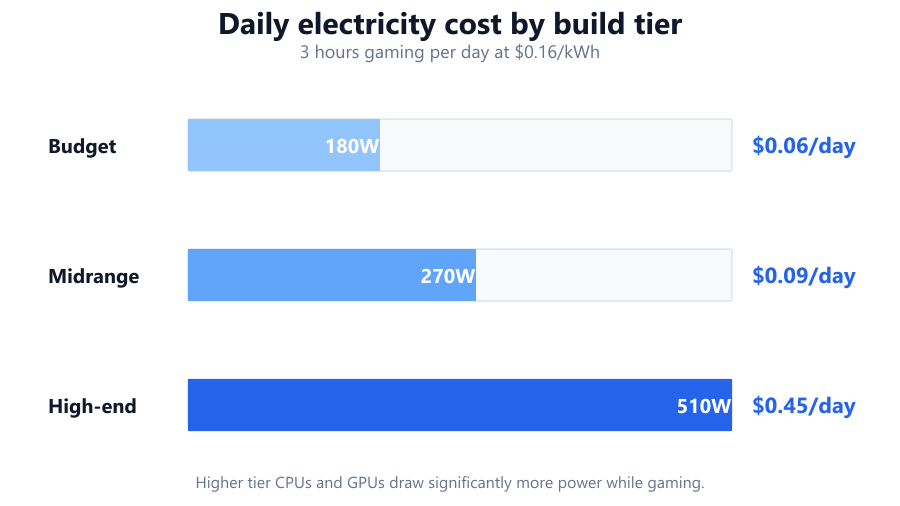
Ryzen 5 5600X, RTX 3060, 16GB RAM, 1 SSD. Average gaming wattage: 270W. Plays 2 hours per day. Local rate: $0.16/kWh.
Intel Core i9-13900K, RTX 4090, 32GB RAM, 2 SSDs, 2 HDDs, AIO cooler. Wattage: 510W. 4 hours/day. Rate: $0.22/kWh.
Intel Core i3-12100F, GTX 1650, 8GB RAM. Wattage: 180W. 3 hours/day. Rate: $0.12/kWh.
AMD Ryzen 9 7950X3D, RTX 4080 Super, 64GB RAM, 3 SSDs, 4 HDDs. Wattage: 430W. 5 hours/day. Rate: $0.18/kWh.
Ryzen 7 5800X, RTX 3070, 8 HDDs (WD Red Plus), 2 SSDs. Wattage: 370W. 2.5 hours/day. Rate: $0.15/kWh.
Gamers use this electricity calculator to estimate the real cost of running their PC, especially when budgeting for high-end hardware or looking to cut energy bills. If you're considering an upgrade to a GPU like the RTX 4070 or a new CPU such as the Ryzen 7 7800X3D, you can compare your current and future power usage side by side.
It's also a useful tool if you share a house and split utility costs, or if you're trying to set energy limits for a gaming lounge. For parents, knowing how much a teen's gaming rig adds to the monthly bill can support house rules and budgeting discussions. LAN center operators, streamers, and anyone with multiple systems can plan for total energy use in advance.
Finally, energy-conscious gamers can use the calculator to identify where efficiency upgrades could make a difference, like swapping to a more efficient PSU or undervolting a GPU.
Use your actual CPU and GPU models for best results. If your power supply is particularly old or low-efficiency, actual usage may be 5-10% higher than the calculator suggests. Gaming at higher resolutions (1440p or 4K) typically increases GPU draw, so select the right preset if available. If you use lots of RGB, extra storage, or custom cooling, consider adding 10-20W.
This calculator estimates gaming power draw, not idle or all-day use. Idle draw is much lower, typically 40-90W for modern builds. Laptop gaming power is not covered, as mobile CPUs and GPUs have different profiles. Overclocking, background tasks, and some games (like Cyberpunk 2077 or Microsoft Flight Simulator) can spike power draw higher than averages. Finally, always check your local kWh price, as electricity rates can vary greatly by region and season.
A gaming PC electricity calculator gives you a fast, data-driven estimate of your computer's energy use and running cost. By factoring in your hardware, usage patterns, and local rates, it helps you make informed decisions about upgrades, budgeting, and efficiency. While results are estimates, they're based on real-world measurements for popular gaming hardware. For most users, running even a powerful rig costs less than a cup of coffee per week, but if you game for hours daily or run multiple PCs, the savings from efficient choices can add up.
Running a gaming PC 24 hours a day can get expensive, especially with high-end components. For example, a system using 350W gaming nonstop at a $0.20 per kWh electricity rate would use 8.4 kWh daily, costing about $1.68 per day or over $50 per month. Most gamers use their PC for 2-5 hours a day, so actual costs are usually much lower. Idle power draw is also significantly less than gaming load.
Yes, GPUs like the RTX 4090 can more than double the power consumption of a midrange card like the RTX 3060. The RTX 4090 averages 350-450W under load, while the RTX 3060 typically uses 170-180W. This not only increases your electricity bill but also means more heat output and potentially higher cooling costs.
The calculator provides estimates based on typical measured wattages for CPUs, GPUs, and supporting hardware. It's accurate enough for budgeting and comparison purposes, usually within 10-15% of real-world figures. However, actual power draw can vary with game choice, background applications, resolution, and overclocking. For precise measurement, use a power meter like a Kill A Watt.
A higher-efficiency power supply (for example, 80 Plus Gold instead of Bronze) can reduce wasted energy, especially in high-wattage systems. The savings are small for most gamers - typically a few dollars per year - but can add up in always-on or multi-PC setups. The calculator assumes modern, average-efficiency PSUs unless you specify otherwise.
Check your latest electricity bill. Look for a line labeled 'rate' or 'cost per kWh.' Most utilities quote this in cents or your local currency per kilowatt-hour. If you have a variable rate, use an average or the peak rate for conservative estimates. In the US, rates can range from $0.10 to over $0.30 per kWh depending on region.
Yes, overclocking increases voltage and frequency, which can raise power draw by 10-30% depending on how aggressive the overclock is. This means higher electricity costs and more heat to manage. If you overclock frequently, add an extra 30-70W to your total system estimate in the calculator for a more realistic projection.
Storage has a minor impact compared to the CPU or GPU. A typical SSD adds 2-5W, while a spinning hard drive adds 5-9W when active. Even with multiple drives, storage usually contributes less than 10% of total gaming power draw for most builds. NAS-style setups with many HDDs can add up, but for single-drive gaming PCs, it's negligible.
Generally, yes. Gaming laptops use mobile CPUs and GPUs designed for efficiency. They typically consume 40-150W during gaming, much less than a desktop with similar specs. However, performance per watt can vary, and laptops may throttle under sustained load. The calculator is focused on desktops, not laptops.
RGB lighting, even when set to full brightness, usually draws 5-10W for an entire case, including fans and strips. This is a small fraction of total system power. Unless you have extremely elaborate lighting setups, the impact on your electricity bill is minimal - pennies per month at most.
The calculator only estimates power used while gaming. If you leave your PC on all day, run background tasks, or have other devices plugged in, your total household bill will be higher. Also, some regions have tiered or time-of-use pricing, and not all power supplies are equally efficient. Use a power meter for whole-system measurement if you need exact numbers.
This tool is designed for gaming PCs, not mining rigs. Mining loads are often close to full GPU power, higher than typical gaming usage. For mining, use your GPU's maximum rated wattage, multiply by the number of GPUs, and factor in 24/7 operation for an accurate estimate.
Games vary in how much they stress your hardware. Demanding titles like Cyberpunk 2077 or Microsoft Flight Simulator push GPUs and CPUs harder, increasing power draw. Less intensive games, such as League of Legends or Minecraft, use less energy. The calculator uses average gaming loads, but your actual draw may be lower or higher depending on what you play most.
If you game for just an hour daily, your total electricity cost will be relatively low - often less than $1-3 per month for most systems. However, high-end CPUs or GPUs still use more power in that hour. For longer daily sessions or multiple PCs, the difference becomes more significant.
Yes, the calculator includes a typical efficiency adjustment (usually around 85% for modern PSUs). If your power supply is much older or less efficient, your real power draw at the wall may be slightly higher than estimated. For the most accurate results, input your PSU's rated efficiency.
Undervolting reduces the voltage supplied to your CPU or GPU, which can lower power consumption by 5-20% depending on the hardware and settings. Many users see no performance loss but benefit from a cooler, quieter, and more efficient system. The calculator does not directly model undervolting, so manually subtracting 10-15% from the estimated wattage can provide a ballpark figure.
The calculator's estimated wattage during gaming is a good baseline for sizing a UPS, but remember to factor in your monitor and any external devices. Always choose a UPS with at least 20-30% more capacity than your peak power use to allow for battery aging and short power surges.
Free tools to analyze, compare, and optimize your PC gaming performance
Check if your PC meets the requirements for these popular games
Benchmark data from PassMark and publisher specs. Calculators run locally in your browser — we never upload your hardware info.