FREE PCIE BANDWIDTH CALCULATOR

PCIe Bandwidth Calculator

Need to know how much bandwidth your PCIe slot really delivers? This PCIe bandwidth calculator instantly shows the maximum theoretical throughput for any PCI Express generation and lane width. Enter your configuration and get clear, exact PCIe speeds in GB/s—no guesswork.

Select PCIe Configuration

How It Works

PCIe bandwidth = per-lane speed × number of lanes. Gen3 provides ~0.985 GB/s per lane, Gen4 ~1.969 GB/s, and Gen5 ~3.938 GB/s. These are theoretical maximums — real-world throughput is slightly lower due to encoding overhead.

Bandwidth Result

Select generation and lanes, then calculate

What Does This Calculator Do?

The PCIe bandwidth calculator takes your selected PCI Express generation (Gen3, Gen4, Gen5, and so on) and number of lanes (x1, x4, x8, x16) to determine the theoretical maximum data rate for that connection. It covers the most common use cases, from graphics cards and SSDs to networking adapters. The result is shown in gigabytes per second (GB/s), which helps you compare slot speeds to the bandwidth demands of your devices.

This tool is useful for system builders, upgraders, and professionals planning workstations or servers. It removes the guesswork from matching PCIe devices to motherboard slots, ensuring you avoid bottlenecks or wasted performance.

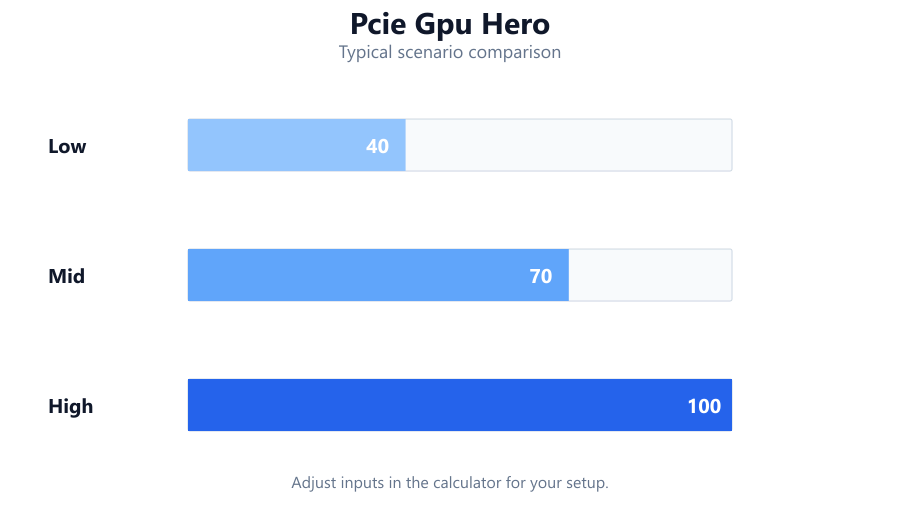
Diagram illustrating pcie gpu hero for PCIe Bandwidth Calculator
Diagram illustrating pcie gpu hero for PCIe Bandwidth…

How to Use This Calculator

Select the PCIe generation your motherboard and CPU support. Most modern consumer boards use Gen3 or Gen4, while high-end platforms and some newer desktops now offer Gen5. Pick the number of lanes for your slot - common options are x1, x4, x8, or x16. For example, a graphics card usually uses x16, while many NVMe SSDs use x4.

Once you enter these values, the calculator outputs the theoretical bandwidth in GB/s. This is the maximum the slot can provide, not the actual speed of your device. You can compare this number with the rated speed of your GPU, SSD, or other PCIe device to check for compatibility or potential bottlenecks.

How Are the Results Calculated?

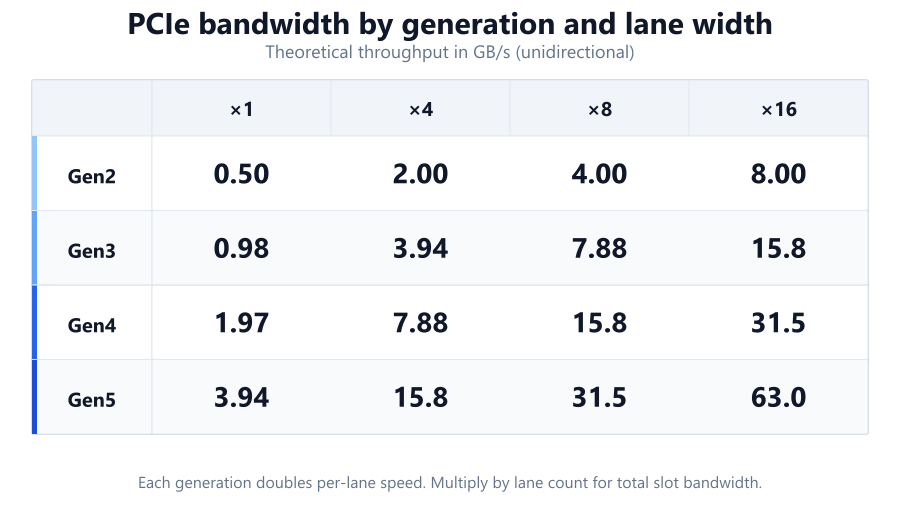
PCIe bandwidth is determined by multiplying the per-lane bandwidth of a PCIe generation by the number of lanes. Each generation doubles the per-lane speed of the previous one.

Formula

Total Bandwidth (GB/s) = Number of lanes × Per-lane bandwidth (GB/s) Reference per-lane speeds (theoretical, unidirectional): Multiply the per-lane value by the number of lanes (x1, x4, x8, x16) to find the slot bandwidth. For example, a Gen4 x4 slot: 1.969 × 4 = 7.876 GB/s (theoretical maximum). Real-world throughput will be lower due to protocol overhead and device limitations.

PCIe Gen3
0.985 GB/s per lane
PCIe Gen4
1.969 GB/s per lane
PCIe Gen5
3.938 GB/s per lane
PCIe Gen2
0.5 GB/s per lane
Diagram illustrating pcie lane bandwidth table for PCIe Bandwidth Calculator
Diagram illustrating pcie lane bandwidth table for PCIe Bandwidth…

Understanding Your Results

The number you see is the absolute maximum bandwidth the PCIe slot can supply, assuming both the motherboard and device fully support the selected generation and lane width. Most consumer graphics cards and NVMe SSDs do not saturate their slots, but high-performance devices - like enterprise SSDs or 400GbE network cards - can come close.

Keep in mind, PCIe is full-duplex, so you get this bandwidth in each direction (read and write). Also, protocol overhead means real-world speeds are typically 2-5 percent lower. If you install a Gen4 SSD in a Gen3 slot, it will run at Gen3 speeds. Lane counts can drop if you use multiple devices or certain chipsets. Always check your motherboard’s slot wiring and CPU support before assuming full speed.

Worked Examples

PCIe Gen3 x16 for a GPU

A Gen3 x16 slot provides 0.985 GB/s × 16 = 15.76 GB/s. This is the standard for RTX 2080, 3070, and similar cards on older boards.

PCIe Gen4 x4 for an NVMe SSD

A Gen4 x4 slot delivers 1.969 GB/s × 4 = 7.876 GB/s. WD Black SN850 and Samsung 980 Pro SSDs use this bandwidth.

PCIe Gen5 x8 for a high-end accelerator

A Gen5 x8 slot offers 3.938 GB/s × 8 = 31.5 GB/s. Used by enterprise GPUs like the Nvidia A100 PCIe or Mellanox network cards.

PCIe Gen2 x1 for a legacy device

A Gen2 x1 slot provides 0.5 GB/s × 1 = 0.5 GB/s. Good for older Wi-Fi or sound cards.

Downrated slot - Gen4 device in Gen3 x4 slot

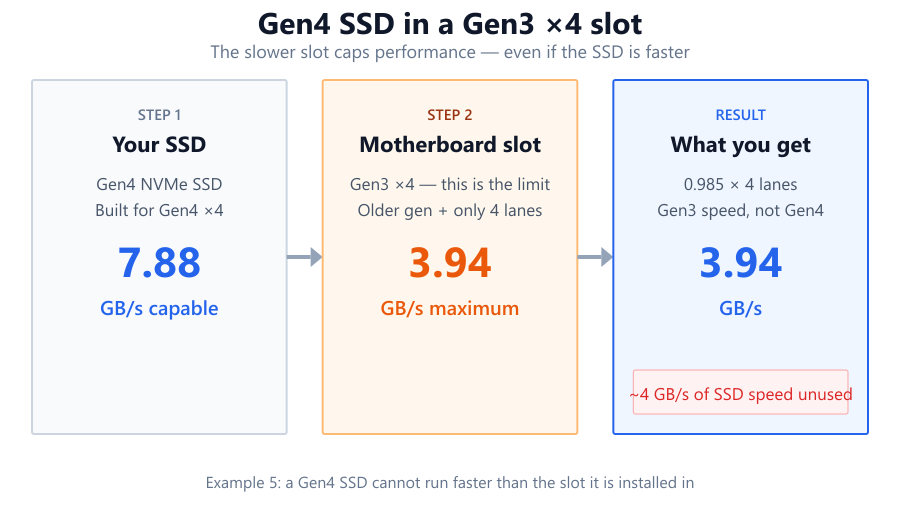
A Gen4 SSD in a Gen3 x4 slot runs at 0.985 GB/s × 4 = 3.94 GB/s. Even if your SSD is faster, it is limited by the older slot.

Diagram illustrating pcie bottleneck diagram for PCIe Bandwidth Calculator
Diagram illustrating pcie bottleneck diagram for PCIe Bandwidth…

Common Use Cases

Matching a graphics card to the right slot: An RTX 4070 performs best in a Gen4 x16 slot, which provides 31.5 GB/s, but it will still run in Gen3 x16 (15.76 GB/s) with a small performance loss in some workloads.

Planning NVMe SSD upgrades: PCIe Gen4 NVMe SSDs like the Crucial P5 Plus need a Gen4 x4 slot for peak performance. On a Gen3 x4 slot, speeds are capped at about half.

Server expansion: High-speed network cards (100GbE or 200GbE) and PCIe accelerators require Gen4 or Gen5 x8 or x16 slots to avoid bottlenecks.

External GPU enclosures: Thunderbolt 3 and 4 typically offer PCIe Gen3 x4 bandwidth (3.94 GB/s), much lower than a desktop x16 slot. This limits external GPU performance.

Debugging bottlenecks: If your SSD or GPU isn't reaching expected speeds, use this calculator to troubleshoot whether slot bandwidth is the limiting factor.

Tips and Pitfalls

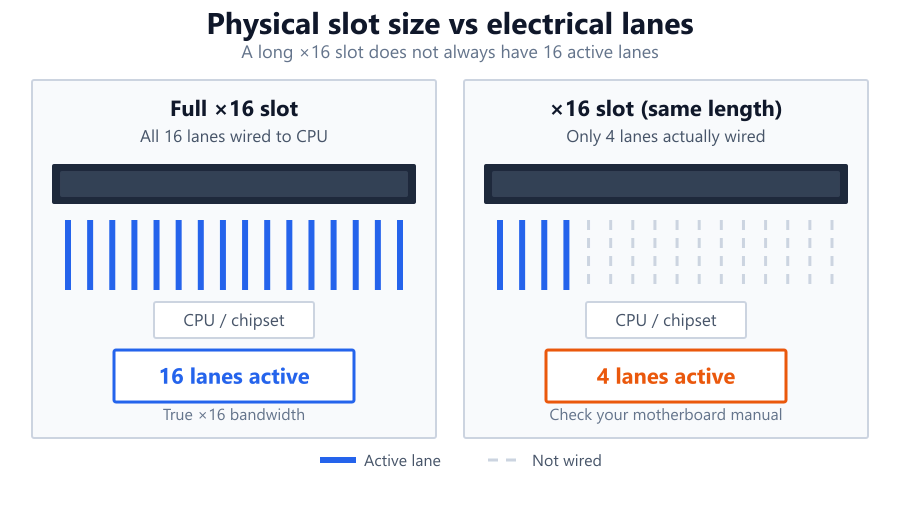
Motherboard slot labeling can be misleading. Not all x16-sized slots have 16 active lanes - some are wired as x4 or x8. Always check your manual.

Mixing generations: Installing a Gen4 device in a Gen3 slot drops to Gen3 speeds. The slowest link in the chain sets the pace.

Diagram illustrating motherboard slot lane wiring for PCIe Bandwidth Calculator
Diagram illustrating motherboard slot lane wiring for PCIe Bandwidth…

Lane sharing: On consumer platforms, using multiple M.2 slots can reduce GPU slot lanes. Chipset and CPU lane allocation matters, especially on AMD B550, X570, or Intel Z790 boards.

Real-world factors: Actual throughput is slightly lower than theoretical due to protocol overhead, BIOS settings, and device controller limits. For SSDs, controller and NAND speed may be the bottleneck, not the PCIe link.

Summary

The PCIe bandwidth calculator helps you quickly check the theoretical throughput of any PCIe slot, making it easier to plan upgrades, troubleshoot slowdowns, or build balanced systems. By understanding slot generations and lane widths, you can avoid mismatches that waste money or cause bottlenecks. The calculator uses industry-standard formulas, but remember that real-world performance depends on your full hardware chain - including CPU, motherboard, and device controller. Always verify your motherboard’s slot wiring and CPU PCIe support for the most accurate results.

Frequently Asked Questions

How much bandwidth does a PCIe Gen4 x16 slot provide?

A PCIe Gen4 x16 slot delivers a theoretical maximum of 31.5 GB/s (gigabytes per second) in each direction. This is calculated as 1.969 GB/s per lane times 16 lanes. It's the standard slot for high-end graphics cards like the RTX 4090 or Radeon RX 7900 XTX. Actual throughput may be slightly lower due to protocol overhead.

Does my PCIe Gen4 SSD work at full speed in a Gen3 slot?

No, a PCIe Gen4 SSD will operate at Gen3 speeds if installed in a Gen3 slot. For example, a Gen4 x4 SSD rated for 7 GB/s will be limited to about 3.94 GB/s in a Gen3 x4 slot. Both the motherboard and CPU must support Gen4 for full performance.

Can I use a PCIe x1 card in a x16 slot?

Yes, PCIe is physically and electrically backward compatible. You can use a PCIe x1 card in a x16 slot, but the card will only use one lane, so bandwidth will be limited to the x1 maximum for that generation. The extra lanes go unused.

What happens if my motherboard slot is physically x16 but wired as x4?

Some motherboard slots are full-length (x16) for mechanical compatibility but have only x4 or x8 electrical lanes. In this case, any installed card is limited to the number of active lanes. For example, a Gen3 x16-sized slot with only x4 lanes provides 3.94 GB/s, not the 15.76 GB/s of a true x16 slot.

How can I check my actual PCIe lane speed and link width?

You can use software tools like GPU-Z, HWiNFO, or CrystalDiskInfo to check the current PCIe generation and lane width for GPUs and SSDs. These tools report the negotiated link speed and width in real time, which is helpful for verifying slot wiring and device compatibility.

Is PCIe bandwidth a bottleneck for modern GPUs?

For most gaming workloads, PCIe Gen3 x16 (15.76 GB/s) is enough for current GPUs like the RTX 4070 or RX 6800. However, some AI, compute, or workstation tasks can benefit from Gen4 or Gen5 bandwidth, and using a card in a lower-bandwidth slot (x8 or Gen3 x8) can reduce performance in data-intensive scenarios.

What’s the difference between PCIe Gen3, Gen4, and Gen5?

Each PCIe generation doubles the per-lane bandwidth of the previous one. Gen3 offers 0.985 GB/s per lane, Gen4 provides 1.969 GB/s per lane, and Gen5 jumps to 3.938 GB/s per lane. This means faster SSDs, GPUs, and network cards can make full use of the latest platforms.

Why is my NVMe SSD not reaching its advertised speed?

Common reasons: the SSD is in a lower-generation slot (Gen3 instead of Gen4), lane count is limited (x2 or x1 instead of x4), or the system’s CPU/motherboard does not fully support the required PCIe standard. Always check your board’s specs and use the calculator to confirm slot bandwidth.

Can two devices share PCIe lanes and reduce each other's bandwidth?

Yes, especially on consumer motherboards where chipset lanes are shared among multiple devices. Installing multiple NVMe SSDs or PCIe cards can cut available lanes for each slot, lowering bandwidth. Always check your motherboard manual and CPU lane allocation.

How do I know if my PCIe slot supports Gen5 devices?

Check your motherboard’s official specifications and CPU support list. Gen5 support is currently found on Intel 12th/13th/14th Gen (Z690, Z790) and AMD Ryzen 7000 (X670, B650) platforms. Even if the board has a Gen5 slot, your CPU must also support it.

How do protocol overheads affect PCIe bandwidth?

PCIe protocol overhead (encoding, error correction, and packet headers) reduces usable bandwidth by 2-5 percent compared to the theoretical maximum. For example, a Gen4 x4 slot with 7.876 GB/s raw bandwidth may deliver about 7.5 GB/s in practice. Device controller efficiency and firmware can further reduce real-world speeds.

What is the actual bandwidth of Thunderbolt 3 and 4 for eGPUs?

Thunderbolt 3 and 4 connections provide a PCIe Gen3 x4 link, which means 3.94 GB/s of theoretical bandwidth. This is much lower than a desktop x16 slot, so high-end GPUs in external enclosures will see reduced performance compared to native installs.

Can I use a PCIe Gen5 SSD in a Gen4 motherboard?

Yes, but the SSD will run at Gen4 speeds. For example, a Gen5 x4 SSD capable of up to 15 GB/s will be limited to about 7.8 GB/s in a Gen4 x4 slot. Both the motherboard and CPU must support Gen5 for full performance.

What PCIe bandwidth is needed for 100GbE or 200GbE network cards?

A 100GbE NIC requires at least Gen3 x16 or Gen4 x8 for full throughput without bottleneck. For 200GbE, Gen4 x16 or Gen5 x8 is recommended. Always check your NIC and motherboard documentation to ensure sufficient PCIe bandwidth.

How does PCIe bifurcation affect total bandwidth?

PCIe bifurcation splits a single slot’s lanes between multiple devices (often for RAID or multiple NVMe SSDs). The total bandwidth is shared across connected devices. For example, bifurcating a Gen4 x16 slot into four x4 segments gives each device 7.876 GB/s, but the total bandwidth remains 31.5 GB/s.

Is there a practical difference between theoretical and real PCIe speeds?

Yes. The calculator shows the raw, theoretical maximum (excluding overhead). In reality, protocol overhead, device controller efficiency, and system architecture reduce usable throughput by 2-10 percent. Always expect slightly lower actual speeds when benchmarking.

Benchmark data from PassMark and publisher specs. Calculators run locally in your browser — we never upload your hardware info.